Klaviyo Pricing 2026: Real Costs From 11+ Accounts
Klaviyo Pricing 2026: Real Costs From 11+ Accounts
Every article about Klaviyo pricing just rehashes their pricing page. Here's what they don't tell you: what it actually costs when you're running it for real, across real ecommerce brands, month after month.
We manage Klaviyo for 11+ retainer clients. We see every bill. We know where the money goes, where it creeps up, and where brands waste it. This is that breakdown.
Key Takeaways
- Across our clients, Klaviyo costs range from ~$150/month to ~$3,500/month, with an average around $1,500
- The two biggest cost drivers are list size and which Klaviyo products you use (email, SMS, reviews, CDP, etc.)
- Klaviyo auto-upgrades your plan but never auto-downgrades — you have to catch it yourself
- Dead profiles are the real pricing creep, not growth from actual customers
- Despite the cost, we consistently see 30-50x ROI on what clients pay Klaviyo
What Our Clients Actually Pay
Here's the real range across the accounts we manage:
| Brand Size | Typical Klaviyo Bill | What They're Using |
|---|---|---|
| Smaller brands (under $1M) | ~$150-$500/mo | Email only, smaller lists |
| Mid-size ($1M-$5M) | ~$500-$2,000/mo | Email + SMS, growing lists |
| Larger brands ($5M+) | ~$2,000-$3,500/mo | Email + SMS + reviews/analytics |
Here's what the actual Klaviyo billing screens look like across three of the accounts we manage — one mid-size brand, one larger brand on Email + SMS, and one enterprise brand pushing 2.5M email sends a month.
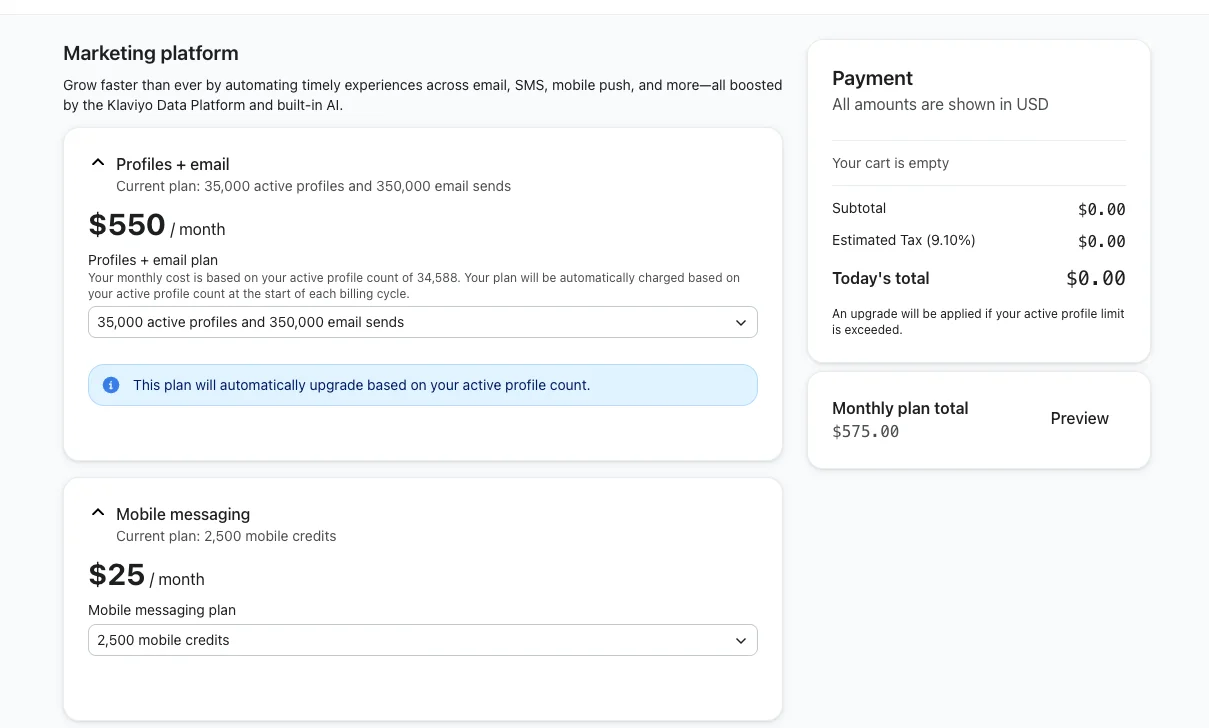
Mid-size client: $575/month all-in — 35k active profiles, 350k email sends, 2,500 SMS credits. This is roughly what a $1M-$5M DTC brand on Email + SMS looks like on the Klaviyo bill.
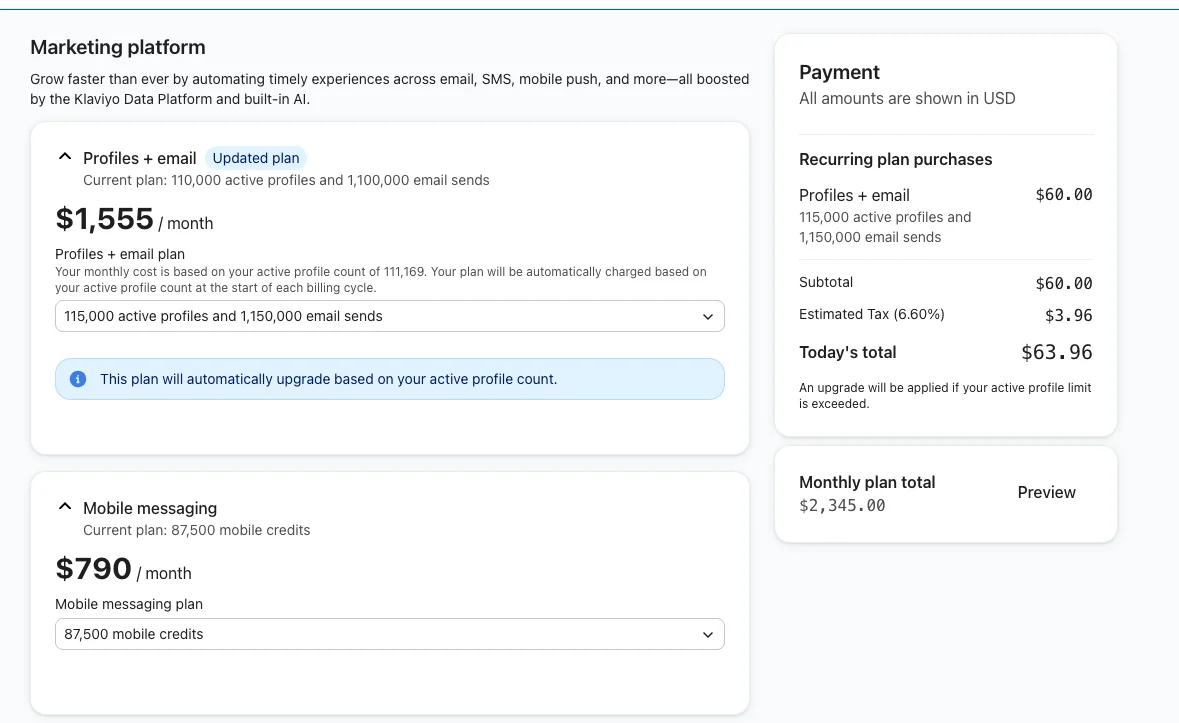
Larger client: $2,745/month — 155k active profiles, 1.15M email sends, and a serious SMS program at 87,500 credits. Notice how SMS becomes a meaningful chunk of the bill (~29%) the moment a brand scales text messaging.
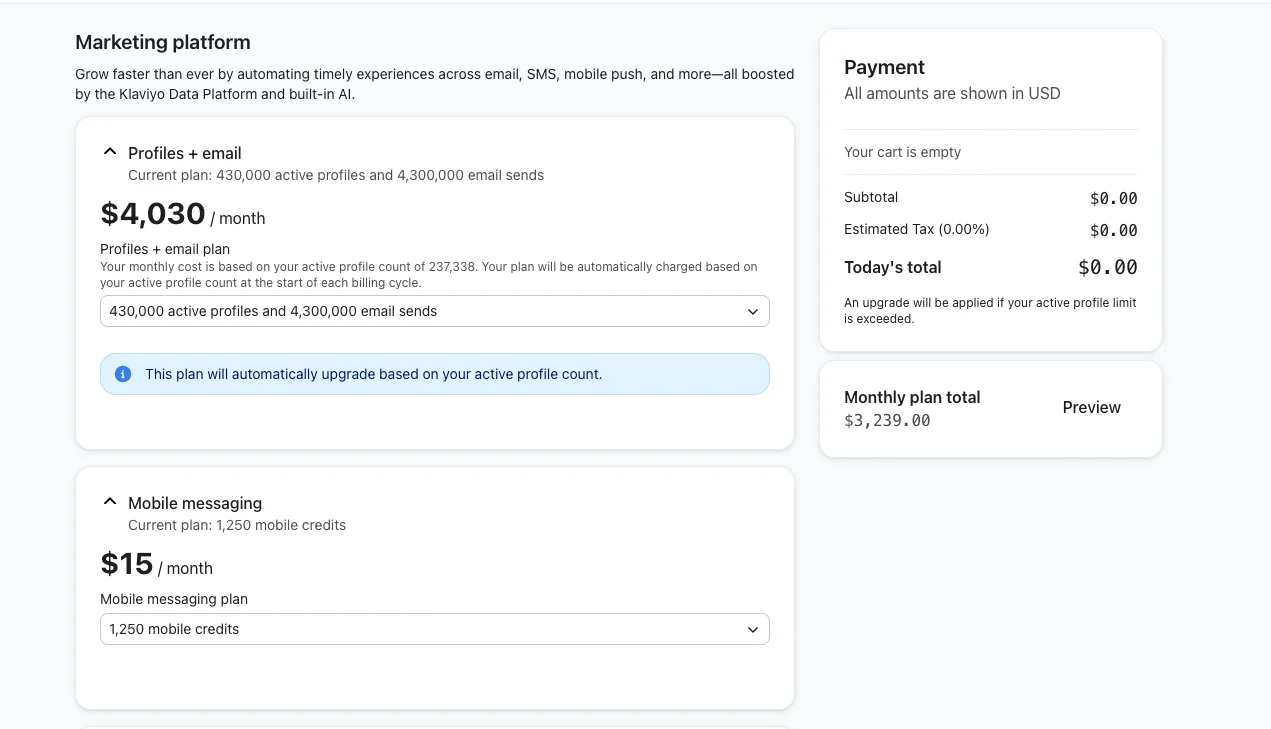
Enterprise client: $4,030/month — 430k active profiles and 2.5M email sends a month. At this scale, the jump isn't the SMS add-on, it's the raw profile count pushing the email tier up.
The average across our client base lands around $1,500/month. But that number is almost meaningless on its own because it depends entirely on two things: the size of your list and how many Klaviyo products you're using.
What Actually Drives the Cost Up
The two biggest cost drivers are straightforward:
1. List size. This is the biggest one. Klaviyo's pricing is profile-based — the more people on your list, the more you pay. Simple enough. But here's where it gets tricky (more on that below).
2. Which Klaviyo products you use. It's not just "Klaviyo" anymore. There's Klaviyo Email, Klaviyo SMS, Klaviyo Reviews, Klaviyo Advanced Analytics, Klaviyo CDP, Klaviyo Customer Hub — and they keep adding more. Each one adds to the bill. The two big ones are email and SMS, and those are both directly tied to your list size and send volume.
The Pricing Creep Nobody Talks About
Here's what actually catches people off guard: it's not that their list is growing with real customers. Nobody complains about having too many paying customers on their email list.
The real problem is dead profiles.
Here's what happens: most brands send to their newsletter list or an engaged segment — maybe a 30-day, 60-day, or 90-day engaged group. They're sending to a small slice of their actual list. But meanwhile, the rest of the profiles just sit there. People get added to lists in different ways — through pop-ups, checkout, imports — and if nobody's cleaning those lists, they just keep getting bigger and bigger.
You end up paying for thousands of profiles that haven't engaged in months (or years). And because you're only looking at your sending segment, you don't notice the bloat building underneath.
Real example: We just ran a big suppression on a new client's account. Removed roughly 20,000-30,000 unengaged profiles. Then readjusted the billing. Saved her $450/month. That's $5,400/year she was paying for profiles that would never buy anything.
The mechanism is simple: we build a sunset segment that captures anyone who hasn't opened, clicked, or purchased in 90+ days, then route them through a suppression flow. Here's the segment that feeds it on this client's account — 3,084 profiles sitting in the sunset queue on the day we set it up.

That segment feeds a static list of already-suppressed profiles over time. After a few cleanup cycles plus a bounce suppression flow, here's how many dead profiles were actually pulled out of the billable count on this one account:

11,168 profiles the brand was paying to store but would never buy from again. Every one of them was coming out of the billable active-profile count and driving the tier up.
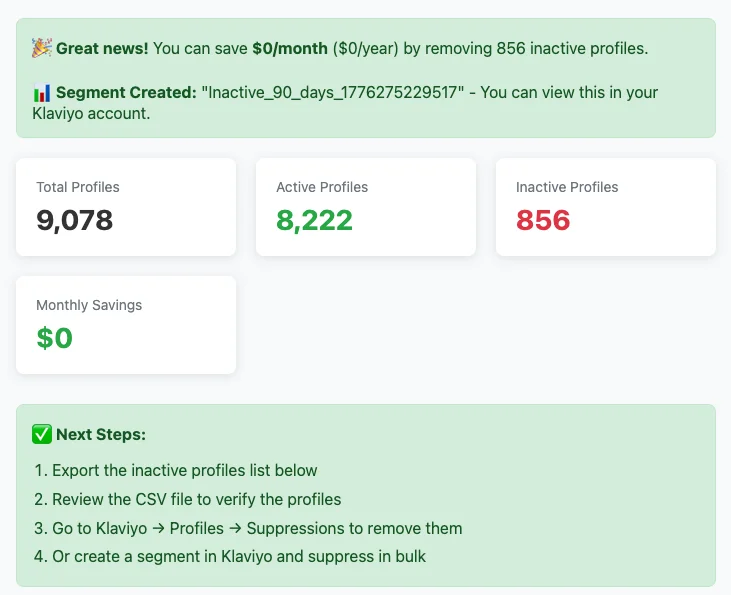
Use our Bill Reducer tool to see how many inactive profiles might be inflating your Klaviyo bill right now. You drop in your numbers and it spits out an actionable cleanup plan:
The Auto-Upgrade Trap
This one's sneaky. Klaviyo will automatically upgrade your billing tier when your list grows past a threshold. Makes sense — you have more profiles, you pay more.
But it does not automatically downgrade you when you reduce your list.
So if your list spikes during Black Friday — more sign-ups, more activity — Klaviyo bumps you up. Then things normalize, but your bill stays at the higher tier. Unless you manually go in and push it back down, you're just overpaying. The same thing happens when you suppress a bunch of profiles: the profiles are gone, but the billing tier stays where it was.
The auto-upgrade shows up as a transactional email that lands in your inbox right before the bill jumps. It looks like this:
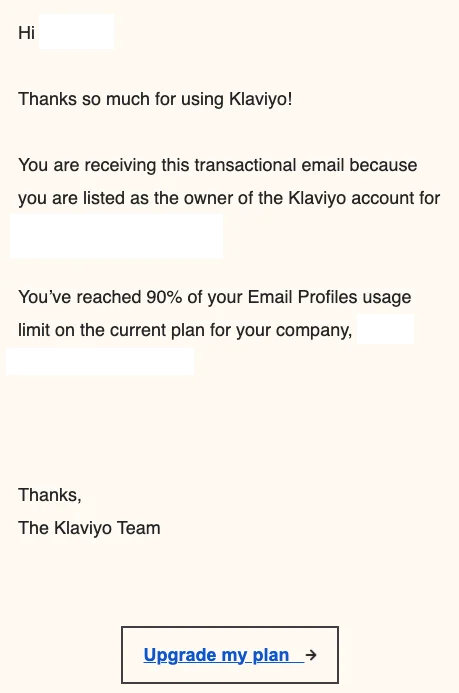
"You've reached 90% of your Email Profiles usage limit." The implicit CTA is upgrade. What it never says is that the same email will not fire when you clean the list back down below the threshold — that part is on you to notice.
You have to actively stay on top of this. Check your billing after every list cleanup.
Not sure if you're overpaying? Book a free audit — we'll check your billing tier, dead profiles, and SMS spend in 15 minutes.
SMS: The Credit Trap
Klaviyo SMS pricing is credit-based. You pay per message sent. Sounds simple. It's not.
A standard SMS costs one credit. But here's what trips people up:
- Long messages (over 160 characters): 2 credits instead of 1
- Include an image (MMS): 3 credits
- Include an emoji: 3 credits (emojis change the encoding, which increases the message size)
This matters more than you'd think. An SMS that costs one credit might be ROI-positive. The same message with an emoji now costs three credits — and suddenly it's breakeven or negative.
Real example: A client came to us confused because she'd sent one SMS campaign and was completely out of credits for the month. Her entire monthly budget, gone in one send. The person managing her SMS had included emojis, which tripled the credit cost. Instead of being able to send three campaigns that month, she got one. The ROI math completely fell apart.
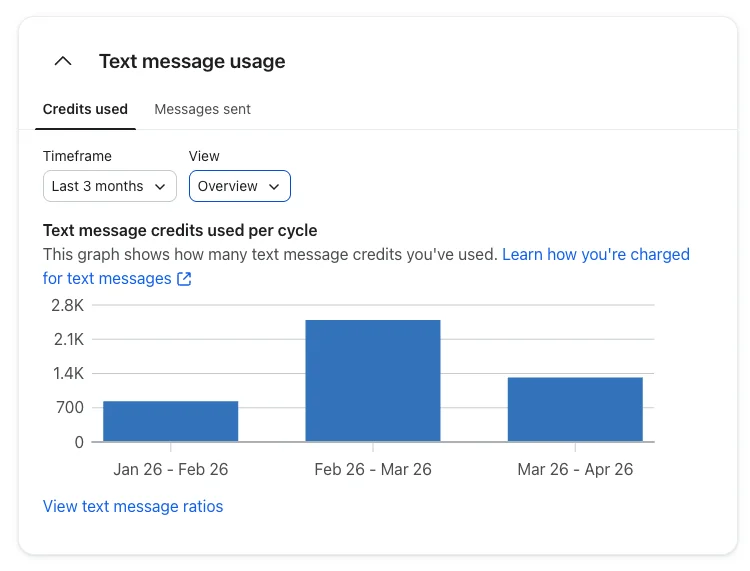
You can watch the credit burn rate directly in Klaviyo's Text message usage view. On this client's account, February ran hot because of a Valentine's Day send — nearly 3x the credits of January. That kind of month-to-month spike is exactly what you want to catch before the bill closes, not after.
Unlike email (where you're paying for the list size regardless), SMS actually charges you per delivery. You need to track the ROI on every send. If an SMS costs $500 to send, did it generate at least $1,000 back? Ideally 2x or more, because you need to cover your cost of goods too. If it didn't, you'd have been better off not sending it at all.
Read our full guide on Klaviyo SMS marketing for a deeper breakdown of costs and strategy.
What the Free Plan Actually Gets You
Klaviyo has a free tier. Here's what it includes:
- Up to 250 active profiles
- 500 email sends/month
- 150 SMS credits/month
- Customer Hub (basic self-service portal)
- Built-in reporting and dashboards
- Basic email templates and drag-and-drop editor
- AI subject line generator and Marketing Agent
- Email support (first 60 days only)
250 profiles is 250 profiles. If your brand is doing any meaningful revenue, you'll outgrow this quickly. But for a brand just getting started, it can last a little while — it depends on how fast you're scaling and how quickly your list grows.
The free tier is honestly fine for exploring the platform and getting the basics in place. Once you need to send to more than 250 people, you're on a paid plan.
Is Klaviyo Worth It?
Clients ask us this all the time. Usually phrased as "it's really expensive — is it really worth it?"
Yes. Every time. We've never seen an ecommerce brand where Klaviyo wasn't worth it — as long as they're actually using it.
Across our client base, we typically see 30-50x returns on what clients pay Klaviyo. A brand paying $1,500/month is often generating $30,000-$50,000+ in email revenue through the platform. A brand paying $3,500 might be generating half a million. The ROI gets kind of crazy.
The only time Klaviyo isn't worth it is when you're not taking advantage of it. We've seen brands paying hundreds of dollars a month with two flows set up and zero campaigns going out. That's not a "Klaviyo isn't worth it" problem — that's a "you're not using the thing you're paying for" problem.
The other exception: if you're not an ecommerce brand selling direct to consumer. In that case, there are other platforms that are simpler and cheaper. Klaviyo's power is in its ecommerce integrations, its segmentation engine, and its flow builder — and those only matter if you're selling products online.
Read our full Klaviyo review for a deeper breakdown.
"But Mailchimp Is Cheaper"
People look at the price tag and think they should go with something cheaper. Omnisend, Mailchimp, whatever. And yeah, those tools cost less.
But you're tripping over dollars to pick up pennies.
Klaviyo costs more because you can do more. And because you can do more, you generate more revenue. The additional functionality — better segmentation, better flows, better data, better integrations — directly translates into money.
If Omnisend costs you $500/month and Klaviyo costs you $1,000/month, but Klaviyo generates an extra $10,000 in revenue — you take that trade all day. The cheaper tool is actually the more expensive one when you factor in what you're leaving on the table.
See our full comparison: Klaviyo vs Mailchimp and Klaviyo vs Omnisend.
The Hidden Cost: Time
Klaviyo's real cost isn't just the monthly bill. It's the time it takes to actually use it well.
Klaviyo is powerful. You can do an enormous amount with it — complex flow logic, advanced segmentation, conditional content, deep analytics. But that power means complexity. It's like Salesforce for ecommerce email: you can do everything and anything, but to use it well, you need someone who really knows the platform.
You need to understand how to build audiences properly, what segments to create, the nuances of flow filters, how to set up the right exclusions, how to avoid the gotchas (like the SMS credit thing above). Most brand owners don't have time to learn all of this.
If you're a smaller brand: you can absolutely do it yourself. Use Klaviyo Academy, get the basics in place, and you'll be fine. Get a welcome flow, an abandoned cart flow, and start sending campaigns. This is a totally viable option when you're not yet at the scale where the advanced stuff matters.
Once you're larger: you need to hire someone. Either an in-house specialist (expensive, but you get full control) or an agency (more cost-effective, less direct control). The platform is too powerful and too complex to leave on autopilot once you're doing real volume.
How to Lower Your Klaviyo Bill Right Now
- Suppress unengaged profiles. Run a suppression on anyone who hasn't opened or clicked in 120+ days and hasn't purchased. This is the single biggest thing you can do. Check our guide on automated list hygiene.
- Check your billing tier. After suppressing profiles, go to Klaviyo's billing page and manually adjust your plan down. It won't do this for you.
- Audit your SMS sends. Check if your messages are using 1 credit or 3. Cut the emojis and images unless the ROI justifies the extra cost.
- Review which Klaviyo products you're paying for. Are you using Reviews? CDP? Advanced Analytics? If you're paying for products you're not actively using, turn them off.
- Set a calendar reminder. Check your billing after every major campaign (especially Black Friday) and after every list cleanup.
Frequently Asked Questions
How much does Klaviyo cost per month?
It depends on your list size and which products you use. Across our 11+ clients, we see a range of $150/month to $3,500/month, with an average around $1,500. Klaviyo's free plan covers up to 250 profiles. After that, pricing scales based on your active profile count.
Is Klaviyo worth the price?
For ecommerce brands, yes. We consistently see 30-50x ROI on what clients pay Klaviyo. The only time it's not worth it is if you're not actively using it, or if you're not an ecommerce brand selling direct to consumer.
Why is my Klaviyo bill so high?
Most likely dead profiles. If you're sending to an engaged segment but haven't cleaned the rest of your list, you're paying for thousands of profiles that will never buy. Run a suppression, then manually adjust your billing tier down.
Does Klaviyo automatically lower my bill when I suppress profiles?
No. Klaviyo auto-upgrades your plan when your list grows, but it does not auto-downgrade when you reduce it. You have to manually go into billing and adjust your tier after suppressing profiles or cleaning your list.
How much does Klaviyo SMS cost?
Klaviyo SMS is credit-based. A standard text message costs 1 credit. But messages over 160 characters cost 2 credits, and messages with images or emojis cost 3 credits. This can dramatically change your SMS ROI if you're not paying attention.
Is Klaviyo better than Mailchimp for ecommerce?
Yes. Klaviyo costs more, but it generates significantly more revenue through better segmentation, automation, and ecommerce integrations. See our full platform comparison.
Not sure if you're getting your money's worth from Klaviyo?
We audit Klaviyo accounts and consistently find wasted spend from dead profiles, auto-upgraded billing tiers, and SMS credit waste. Let us take a look.
Get a Free Email Audit